
Introduction
The application will address all of your issues with time management and productivity. Additionally, it manages your life like a DIGITAL SMART buddy, increasing productivity and helping you strike a balance between work and personal life. in 2024 evolving into a BETTER VERSION.
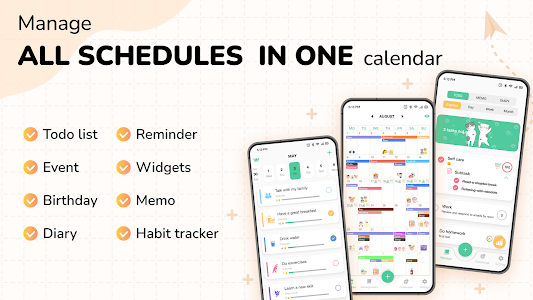
Functionalities like TO-DO LIST, NOTES, DIARY, REMINDER, HABIT TRACKER, and WEATHER are all completely integrated into CUTE CALENDAR – ALL IN ONE. Users may now do everything with a single app and avoid installing other apps thanks to this.
The app has strong supporting sub-features that enhance planning and improve user experience in addition to its primary features:
– Sticker: With Stickers, the app lets you freely express your own style. Todo lists and events may both benefit from this functionality.
– Color scheme: To give your planner a stunning appearance, use color schemes. Here’s a hint to make your planning more efficient.
– Weather: To aid in timely planning, the planner may see the current weather conditions directly on Cute Calendar.
The App Creator highlights the two components that are the most basic and user-friendly with CUTE CALENDAR. Any user may now utilize the app thanks to this. Apart from its adorable design, the app serves as a planning tool for organizing events, projects, to-do lists, and timetables. It also serves as a location to save lovely moments, travelogues, and images.
Let’s examine the app’s features in greater detail:
◆Functions Of The Calendar App:
▷Timetable:
- – Sync using Google Calendar or your own calendaring system.
- You may see your events in List, Day, Week, and Month views.
- – Personalize alerts for reminders
- – Adjust the color of the event.
- – Calendar for the month
- – Calendar for the Year
- – Weekly Schedule
- – Holiday Schedule
- Calendar of Tasks
- – Notes Schedule
- – To-Do List
- – Calendar for the Diary
- – Personalize color schemes: charming, edgy, modern,…
- – Set your calendar as the 2024 trending calendar.
- – Plan events for the whole 2024 calendar year.
▷ Task list (Organizer)
- – Make and organize your tasks, ranging from simple to complex.
- – Make lists of tasks and subtasks.
- – Design assignments that are carried out every day, week, month, and year.
- – Reminding yourself to do tasks
- Get notified when tasks have previously gone incomplete.
- – Task management and statistical reporting
- – Is able to prioritize and pin key jobs.
- – Day Planner
- – Weekly Timetable Creator
- – Monthly Timetable Creator
- – Annual Schedule
- – Day Routine Planner Day Planner
- – Scheduler
- – Life Guidance
- – A task scheduler
- – Daily schedule of tasks
- – Weekly schedule of tasks
- A monthly list of tasks
- – An Excel to-do list
- – A list of things to buy
- Examine your to-do list.
- – 2024 schedule planner
▷ Observations:
- – Write messages in adorable colors.
- – A planner for notes
- Adorable notes
▷ Journal:
- – Diary of feelings
- Make a schedule to take notes one day.
- Adorable schedule
- – Establish a plan for self-evaluation and improvement by 2024.
▷ Patterns:
- – Make a new routine and record your daily difficulties.
- – A daily planner to help create positive habits
- – Form virtuous behaviors for 2024
▷ Stickers:
- – A collection of popular stickers for 2024
- – A sticker-adorned schedule planner
- An agenda adorned with stickers
▷ Adorn:
- – 2024’s trendy décor
- – Make the planner’s calendar stand out.
In Addition To Several Additional Minor Attributes:
- – The private key (FaceID and Passcode)
- – Calendar Widget with many types (monthly, daily, to-do, note), and color-changing capabilities
- – Modify the calendar’s theme
- Modify the background effect
- – Prior notice
- – The Light and Dark Modes
Here Are Some Pointers For Using The Cute Calendar App:
– Students: Make sure you are well-prepared by using the Countdown tool on key exam dates. Utilize Events to organize and schedule your academic work at school.
– Employees in offices: Your to-do list is an invaluable ally. Create a to-do list for the day and mark items on it. Make a schedule so you can document your day’s activities.
– Florist: To avoid missing anything, compile a list of varieties to purchase during the day using a to-do list. Create an agenda so you can record the day’s orders.











