

Introduction
For those who are interested in the internal workings of their mobile device, Device Info is an Android app. You may get real-time performance statistics, thorough insights into hardware and software specs, and a variety of diagnostic tools to examine the hardware on your phone using Device Info. Device Info should be your first choice if you want to learn more about your device for the following reasons:
Detailed Dashboard For Important Device Information
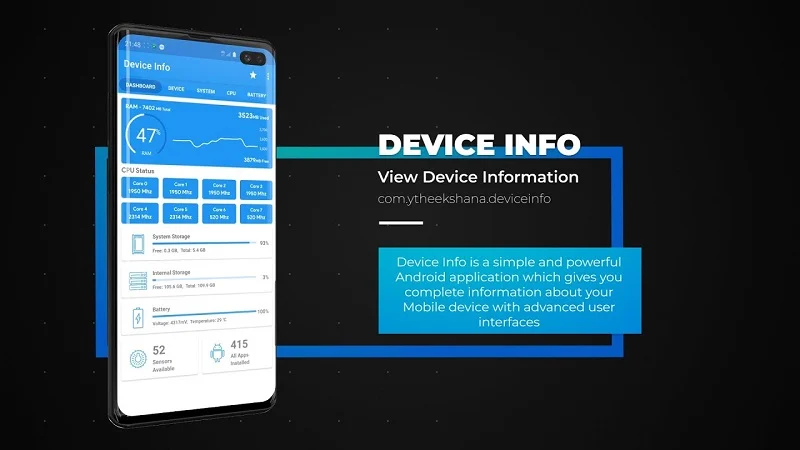
Device Info begins with a robust dashboard that provides quick access to data on the functionality and use of your phone. You can quickly check the status of key components on your smartphone, such as RAM, storage, battery, and CPU. The software improves this data with insights like available sensors, system applications, and the memory capacity your apps are utilizing, in addition to displaying basic information. You can monitor any odd changes in your device’s performance with the aid of this level of information, which provides you with a comprehensive picture.
Advanced System Analysis And Hardware
Are you curious about your device’s precise specs? All the necessary information is provided by Device Info, including the name, model, manufacturer, serial number, and even the network carrier information of your device. Further information on your operating system, kernel, Java Virtual Machine, and root management (if applicable) may be found in the “System” section. Device Info makes sure you are completely informed about everything from the OS version to the bootloader to the system uptime. Crucial CPU and GPU statistics are also shown, including processor clock, architecture, supported ABIs, and core count. This level of detail is quite helpful, particularly for those who want to know what drives their smartphone.
Network, Display, And Battery Insights
The usefulness of a smartphone is greatly influenced by its battery performance. Device Info provides detailed information on battery health, charging source, voltage, and temperature in addition to your current charge level. It provides you with real-time connection information by highlighting your IP address, DNS server, and link speed. Metrics including screen resolution, brightness, HDR compatibility, and refresh rate choices are provided via display analysis, enabling users to adjust their settings for improved visuals or power efficiency. You can improve screen performance, find connectivity problems, and extend battery life using Device Info.
Tools For Testing Devices And Sensor Information
Device Info’s device testing tool, which lets you interactively examine the main physical components of your phone, is one of its most distinctive features. The screen, lights, speakers, microphone, sensors, and even Bluetooth and Wi-Fi connections are all testable. When troubleshooting, this functionality is quite helpful since it verifies that every component is operating as intended. Device Info is a crucial tool for app developers, tech fans, and technicians since it offers comprehensive sensor data, including real-time readings for all of your phone’s sensors, including the gyroscope, proximity sensor, and accelerometer.
Reports, Customizable Widgets, And Camera Specifications
With the help of Device Info’s assortment of customized widgets, you can monitor vital data from your home screen, like temperature, RAM, and storage. Multiple widgets may be added to different displays, and their appearance can be changed. Additionally, Device Info lets you export comprehensive reports in PDF or text format, which you can use as a professional document or share with others. Device Info provides a comprehensive overview of camera features, such as supported HDR modes, lens specifications, and resolutions, for photography aficionados. Device Info offers the most thorough information accessible for any camera module, even if Android’s OS may restrict certain information.
Device Info is perfect for anybody who wants to learn more about their phone since it blends a plethora of information with simplicity of use. This software is intended to provide you all the information you want, whether your goal is to improve performance, solve problems, or just quench your curiosity. To fully use your smartphone and have a robust diagnostic tool at your fingertips, download Device Info now.











